 English
 Deutsch
 Polski
 Română
 Čeština
 Melayu
 Bahasa Indonesia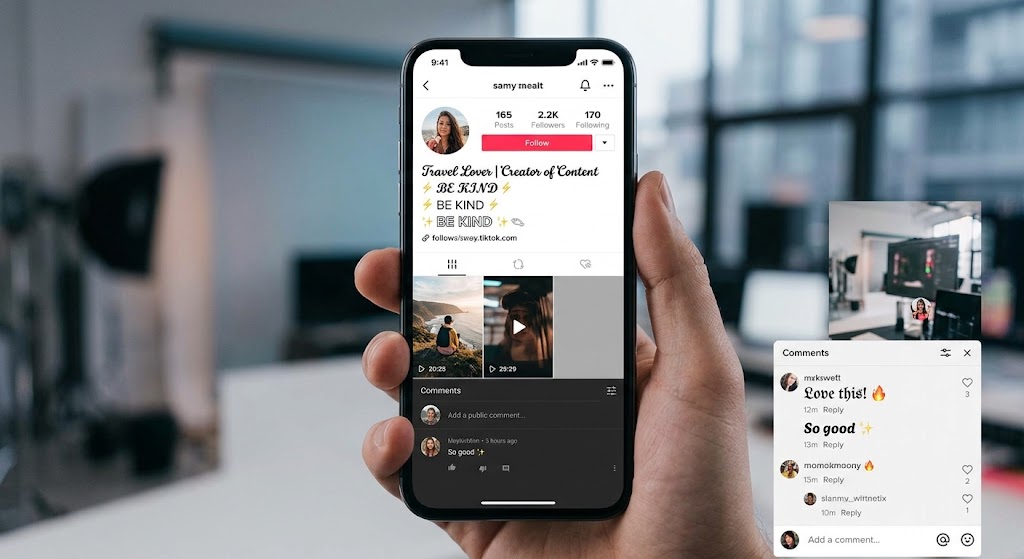
Getting stylish fonts on tiktok bios and comments helps your account stand out instantly. TikTok is a fast-paced video platform built around creativity. Millions of creators upload videos, write comments, and update their profiles every day. Because of this massive activity, making your profile and comments stand out is essential.
Standard text inside the app can look generic and plain. Custom text styles, however, give your account a distinct visual identity. When your username, bio, or comments feature unique characters, viewers notice them instantly. In this step-by-step guide, you will learn how to get stylish fonts on tiktok bios and comments easily.
Why You Should Customize Your TikTok Bio and Comments
Custom character styles offer several direct benefits for growing your TikTok account.
- Increases Comment Visibility: Unique letters in a busy comment section grab immediate attention. Because your comment stands out, more users read and like it.
- Builds a Memorable Profile: A styled profile description communicates your personality or brand visual identity fast.
- Highlights Important Links: Custom headers draw viewer eyes straight to your website link or social handles.
- Boosts Audience Engagement: Creative styling encourages users to pause their scroll and interact with your posts.
How Custom Fonts Work on TikTok
TikTok does not provide built-in custom typography settings inside the app. Instead, custom text generators use a global standard called Unicode.
Unicode is a universal system containing thousands of special visual symbols alongside standard letters. Online tools swap your regular letters with visual symbol equivalents from the Unicode library.
Because these custom designs act as standard digital symbols rather than uploaded image files, TikTok recognizes them natively. You can copy these characters from a browser and paste them directly into your TikTok profile or comment box without any technical issues.
Step-by-Step Guide: Stylish Fonts in TikTok Bio
Updating your profile text takes less than two minutes. Follow these clear steps to refresh your account layout today.
Step 1: Draft Your Bio Text
Write your bio message in a notes app first. TikTok limits your profile description to 80 characters. Because of this strict character limit, keep your message short, bold, and clear.
Step 2: Open an Online Text Generator
Launch your mobile web browser and visit our free Font Generator. You do not need to download extra apps or create an account.
Step 3: Type Your Message into the Tool
Paste your drafted text into the top input field. The generator instantly produces dozens of unique character variations below.
Step 4: Select Your Favorite Style
Scroll through the generated list. Choose a clear, bold, or aesthetic style that fits your content niche.
Step 5: Copy the Styled Characters
Tap the Copy button next to your chosen design to save the characters to your phone clipboard.
Step 6: Open TikTok and Edit Profile
Launch the TikTok app and go to your profile tab in the bottom right corner. Tap the Edit Profile button located under your follower count.
Step 7: Paste Your New Bio Text
Tap the Bio field. Clear out your old text, then hold down and select Paste to insert your styled characters.
Step 8: Save Your Changes
Tap Save in the top right corner. Go back to your main profile page to confirm your new layout looks clean and readable.
Step-by-Step Guide: Stylish Fonts in TikTok Comments
Adding eye-catching text to your comments follows a similar process.
- Write Your Comment: Draft your response or video reaction.
- Generate Styled Text: Open our Fancy Text Generator in your browser and paste your comment.
- Copy the Output: Pick a bold or bubble style and copy the new characters.
- Paste in TikTok: Open the TikTok video comment section, paste your text, and tap Send.
Best Practices for TikTok Text Styling
Using custom characters is fun, but overusing them can hurt your user experience. Follow these simple guidelines to maintain high readability.
Prioritize Readability on Small Screens
Some decorative script styles are hard to read on phone displays. If viewers cannot read your comment instantly, they will skip it. Choose clear, heavy styles like Bold Sans-Serif or Small Caps for main messages.
Keep Symbol Usage Moderate
Do not convert your entire bio into complex symbols. Instead, style key header words or calls to action while leaving standard info in regular text.
Test Display Compatibility
Older mobile operating systems might not support certain newer Unicode characters. Check your profile from a second device to ensure your letters do not display as empty square boxes.